Short answer: Choose Screen Studio if you want polished Mac product demos with automatic zoom and cursor smoothing and very little editing. Choose ScreenFlow if you want a full Mac video editor with a multi-track timeline, callouts, and a one-time $199 license.
Both are Mac-only, both record screen, webcam, and audio, and both can record an iPhone or iPad. The real difference is how much of the editing you want to do yourself.
Screen Studio vs ScreenFlow at a Glance
| Screen Studio | ScreenFlow | |
|---|---|---|
| Pricing | $29/month or $108/year | $199 one-time |
| Platform | macOS only | macOS only |
| Automatic zoom | Yes, follows clicks automatically | No, zooms are added manually |
| Editing | Focused editor for zooms, trims, and styling | Multi-track timeline editor |
| Annotations and callouts | Limited | Yes |
| iPhone and iPad recording | Yes | Yes |
| Stock media library | No | Optional, $99/year |
| Best for | Product demos, launch videos, social clips | Tutorials, YouTube videos, longer edited content |
Where Screen Studio Wins: Automatic Polish
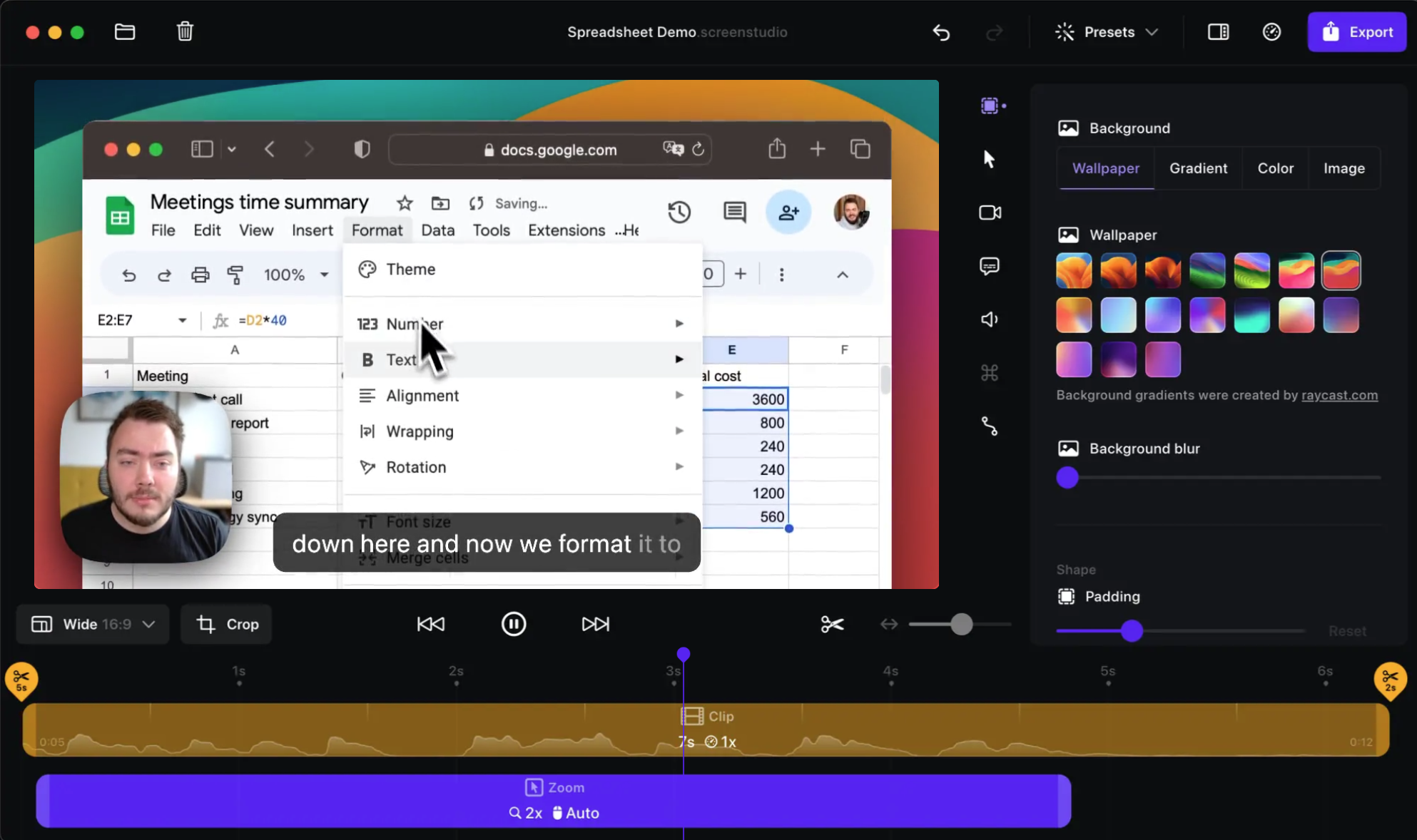
Screen Studio is built for creators who want recordings to look finished without an editing session. It follows your cursor, zooms in on clicks, smooths mouse movement, and adds motion blur automatically. Backgrounds, padding, rounded corners, and webcam layouts are a few clicks away.
For a two-minute feature walkthrough, a landing page video, or a social clip, that automation saves a lot of time. You record, adjust a couple of zooms, and export.
The limit shows up on longer or more complex videos. There is no multi-track timeline, so combining several clips, adding B-roll, or building detailed annotations is harder than in a traditional editor.
Sponsored by the makers
Tired of boring screen recordings?
Try Screen Charm.
Auto-zoom, captions, motion blur, camera overlay and a vertical layout for Shorts. Record once, export a polished video.
Screen Charm is a native macOS app.
Where ScreenFlow Wins: A Real Editor for Mac
ScreenFlow, made by Telestream, is a Mac video editor with screen recording built in. It records screen, webcam, microphone, system audio, and connected iOS devices, then drops everything onto a multi-track timeline.
From there you can add text, callouts, arrows, cursor highlights, click effects, transitions, and captions, and control every clip precisely. It feels closer to a lighter Final Cut Pro built for screencasts than to an automatic recorder.
That makes ScreenFlow a good fit for:
- YouTube creators who edit longer tutorials
- Educators building lessons with callouts and text
- Anyone who wants frame-level control over the final video
The trade-off is time. ScreenFlow does not add automatic zooms, so the polished "demo" look takes manual keyframing.
Pricing: Subscription vs One-Time
- Screen Studio: $29/month or $108/year, subscription only.
- ScreenFlow: $199 one-time. The optional Stock Media Library is $99/year and Premium Support is $59/year. New major versions have typically been paid upgrades for existing owners.
Over three years, Screen Studio costs about $324 on annual billing, while ScreenFlow costs $199 if you skip the add-ons and don't upgrade to a new major version.
Which One Should You Choose?
Choose Screen Studio if:
- You make short product demos, launch videos, or social clips
- You want automatic zoom, cursor smoothing, and motion blur
- You prefer adjusting effects over editing a timeline
- You export GIFs for docs or changelogs
Choose ScreenFlow if:
- You edit longer tutorials, courses, or YouTube videos
- You want a multi-track timeline, callouts, and text overlays
- You prefer a one-time license over a subscription
- You want full manual control over every clip
A Third Option: Automatic Polish for a One-Time Price
If you want Screen Studio's automatic workflow but ScreenFlow's pay-once model, Screen Charm sits between the two. It is a Mac screen recorder with automatic zoom on clicks, cursor effects, motion blur, background music, captions, webcam overlay, system audio, and 4K export, for $79 once with lifetime updates.
It isn't a multi-track editor, so heavy post-production still belongs in ScreenFlow or Final Cut Pro. Compare the details in Screen Charm vs Screen Studio and Screen Charm vs ScreenFlow.
Frequently Asked Questions
Is Screen Studio better than ScreenFlow?
Screen Studio is better for fast, polished product demos because zoom and cursor smoothing happen automatically. ScreenFlow is better for longer videos that need a multi-track timeline, callouts, and detailed manual editing.
Does ScreenFlow have automatic zoom?
No. ScreenFlow supports zoom and pan effects, but you add and time them yourself on the timeline. Screen Studio and Screen Charm zoom automatically based on your clicks.
Is ScreenFlow a one-time purchase?
Yes. ScreenFlow costs $199 one-time. The Stock Media Library ($99/year) and Premium Support ($59/year) are optional add-ons.
Can Screen Studio and ScreenFlow record an iPhone?
Yes. Both can record a connected iPhone or iPad screen on a Mac.
Which is cheaper over time, Screen Studio or ScreenFlow?
ScreenFlow, if you use it for more than about two years without buying a paid upgrade. Screen Studio costs $108 per year, while ScreenFlow is $199 once.