Turning your Instagram Reels into a real, dependable income stream isn't just a fantasy. It's about being smart and combining what Instagram gives you—like ads and gifts—with your own hustle, like landing brand deals, using affiliate links, and selling your own stuff. The whole game is about making content that people actually want to watch and act on.
Why Instagram Reels Are a Monetization Goldmine
Think of Reels as more than just a place to post fun videos. For creators, developers, and marketers, they're a powerful tool for making money. The real trick is to stop thinking about "making videos" and start thinking about building a content engine that actually pays the bills.
What makes Reels so special is their incredible discoverability. The algorithm is built to show great content to huge new audiences, even if you don't have a massive following yet. This is your ticket to connecting with potential customers all over the world in a way that regular posts just can't anymore.
The Unmatched Reach of Reels
The numbers don't lie. Reels are dominating the platform. In the U.S. alone, 150 million people watch Reels every month. Across Instagram and Facebook, Reels get over 100 billion+ plays every single day.
Even more telling, Reels now account for 50% of all the time people spend on Instagram. For brands, this translates into real results: branded Reels see 67% more engagement than standard static ads.
But here’s the most important stat for creators trying to grow: over 60% of Reels views come from non-followers. That means every single Reel you post is an opportunity to break out of your current audience and go viral.
This flowchart maps out a clear path to earning money with Reels, whether you're just starting out or already have a big following.
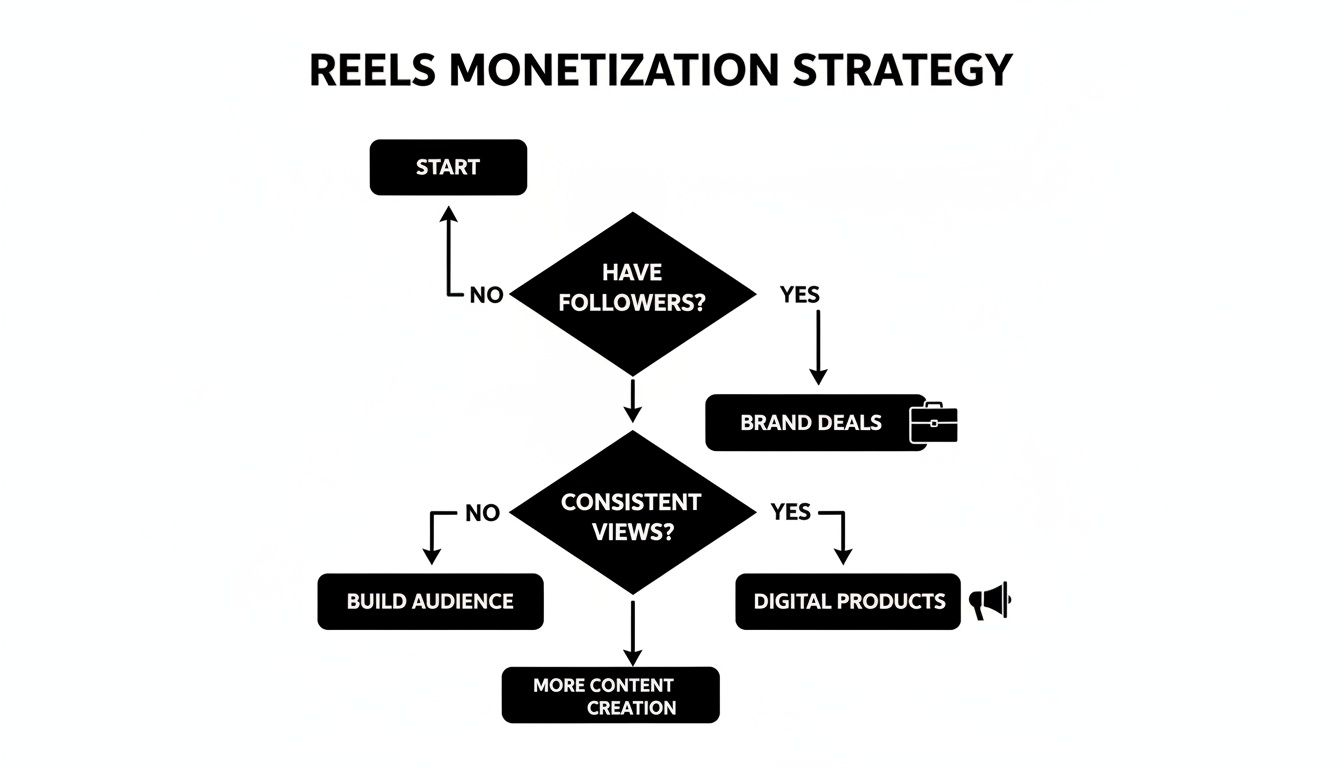
As you can see, there's a strategy for every stage. If you're still building your audience, we've got a fantastic guide on how to grow social media followers that can help you get there faster.
The big takeaway? Reels are your direct line to people who have no idea who you are. Your job is to make content so good that a complete stranger stops scrolling and feels an immediate urge to follow you or check out the link in your bio.
Before we dive into the nitty-gritty of each method, let's get a quick lay of the land. This table breaks down the six main ways you can make money from your Reels, helping you figure out which path makes the most sense for you right now.
Six Proven Paths to Monetize Your Instagram Reels
| Monetization Method | Best For | Effort Level |
|---|---|---|
| Platform Payouts (Ads, Bonuses) | Creators with high view counts and engagement. | Low |
| Direct Fan Support (Badges, Tips) | Creators with a loyal, engaged community. | Low to Medium |
| Brand Deals & Sponsorships | Influencers and niche experts with a defined audience. | High |
| Affiliate Marketing | Creators who review or recommend products. | Medium |
| Selling Your Products or Services | Entrepreneurs, developers, and coaches. | High |
| Driving Traffic to External Platforms | Bloggers, course creators, and YouTubers. | Medium |
Each of these avenues offers a unique opportunity. Now, let's explore how to set up and succeed with each one.
Earning Directly from the Instagram Platform
Let's start with the most direct route to making money from your Reels: using the tools Instagram has already built for creators. This is all about earning cash straight from the platform itself, without having to find brand deals or sell your own products. You're essentially getting paid for the views and engagement you're already generating.

Instagram's native tools are basically a reward system for keeping people on the app. While some of the older programs like the Reels Play Bonus have come and gone, the platform is always rolling out new ways for creators to earn. Right now, there are two main ways to do this.
Capitalizing on Ads on Instagram Reels
The Ads on Reels program is Instagram's take on a classic revenue-sharing model. Once you turn this on, Instagram will start placing ads on your Reels—sometimes before, during, or after your video plays. For every view those ads get, you get a slice of the revenue. It's as simple as that.
What you earn really boils down to two things:
- Your Views: The more plays your Reel racks up, the bigger your potential paycheck.
- Ad Performance: The success of the specific ad shown on your video also plays a role in how much you get.
Because it's performance-based, your income will likely vary from month to month. But it’s a brilliant, hands-off way to generate some passive income from the content you were going to make anyway. To get going, you’ll need to have a Professional account and meet the eligibility criteria, which you can easily check right in your Professional Dashboard.
Think of Ads on Reels as your content's rent money. Your Reels provide the 'space,' and brands pay to advertise there. Instagram handles all the logistics; your only job is to create videos people actually want to watch.
If you’re a macOS app developer, this is a perfect starting point. A quick tutorial or a Reel showing off a slick new feature can pull in a ton of views, and those views can now translate directly into ad dollars. Just focus on consistency and making content that keeps viewers hooked.
Activating Instagram Gifts for Fan Support
Beyond ads, Instagram Gifts is another fantastic way to earn directly from your audience. This feature lets your most loyal followers send you virtual "Gifts" to show their appreciation, which pop up as cool animated icons on your Reels.
Viewers buy these Gifts using a virtual currency called "Stars." When they send one your way, you receive a share of that revenue. It’s a direct financial thank-you from your community for the value you provide.
This approach works especially well if you've put in the time to build a strong, connected audience. When your followers feel like they genuinely benefit from your app demos or tutorials, they're much more likely to send a Gift to show their support.
For instance, a great Reel demonstrating a unique cursor customization in your macOS app could easily prompt a fan to send a Gift. The data backs this up: 58-62% of influencer campaigns now involve Reels, and creators using a mix of monetization strategies are seeing 36% higher success year-over-year. You can dig into more stats about 2025 Instagram Reels pay rates on stackinfluence.com.
To give your audience a little nudge, try adding a simple call-to-action in your caption or as a text overlay. Something like, "Love this tip? Your support helps me make more content like this!" can make a huge difference in your earnings from this feature.
Sponsored by the makers
Tired of boring screen recordings?
Try Screen Charm.
Auto-zoom, captions, motion blur, camera overlay and a vertical layout for Shorts. Record once, export a polished video.
Screen Charm is a native macOS app.
Securing High-Value Brand Deals and Sponsorships
Let's talk about the big leagues: brand partnerships. While Instagram's built-in monetization tools are great for getting started, collaborating with brands is where you can build a truly sustainable business from your content.
This is about more than just getting paid for views. Brands will pay you to create Reels featuring their products or services because you've built a dedicated audience they want to reach. It takes more hustle than flipping a switch on in-app ads, but the payoff can be exponentially higher.
First, Know What You're Worth
Before you ever think about sending a pitch, you need to get crystal clear on what you're actually selling. It’s not just a 30-second video. You’re offering brands a direct line to a specific community you've carefully cultivated. They’re paying for your credibility and the trust you’ve earned.
So, what’s your corner of the internet? Are you the authority on minimalist macOS apps? A productivity guru who can make anyone's workflow more efficient? A designer with an eye for the best visual tools? Nailing down your niche is the first step because it immediately tells you which brands are a perfect match.
Once you know your specialty, you need a media kit. Think of it as your professional resume for sponsorships. It’s a non-negotiable.
Your media kit should include:
- Your Audience Snapshot: Who follows you? Include key demographics like age, gender, and top countries or cities. You can pull all of this straight from your Instagram Insights.
- Your Performance Metrics: Don't just list follower count. Showcase your average Reel views, engagement rate (likes + comments + shares / followers), and reach. These numbers tell the real story.
- Proof of Work: If you have them, include examples of past brand collaborations. This shows you know what you're doing.
- Your Menu: Clearly outline your services (e.g., a single Reel, a three-Reel package) and your starting prices.
A sharp, professional media kit does half the selling for you. It shows you’re serious, answers a brand's first few questions, and immediately frames the conversation around the value you deliver.
Pitching Brands and Talking Money
With your media kit ready, it's time to go on the offensive. Don't just sit back and hope brands will find you. Make a dream list of companies whose products you already use and genuinely love. Authenticity is everything—your followers will see right through a forced partnership.
When you reach out, make it personal. A generic copy-paste email will get you nowhere. Mention a specific product you're a fan of and pitch a creative Reel idea that you know your audience would love. For instance, if you’re a developer who loves a particular macOS coding tool, you could outline a Reel showing how that tool solves a frustrating problem your followers complain about.
Here’s a simple pitch structure that works:
- A Killer Subject Line: Something like, "Reels Collab Idea | [Your Instagram Handle] x [Brand Name]".
- The Quick Intro: Briefly say who you are and why you're a genuine fan of their brand.
- Your Value Prop: Hit them with 1-2 powerful stats. "My Reels average 50,000 views and reach a core audience of tech professionals aged 25-40."
- The Big Idea: Lay out your specific Reel concept.
- The Ask: End with a clear call to action. "I've attached my media kit with my rates and more details. Are you open to exploring a partnership?"
Pricing can feel like the trickiest part. A good place to start is the 1% rule: charge roughly 1% of your follower count for a single piece of content. If you have 20,000 followers, your starting point for one Reel might be around $200. This is just a baseline—you can and should adjust it up based on your engagement rate, the scope of the project, and your experience level.
For a deeper dive, this guide on Instagram sponsorship for small accounts has some fantastic, practical advice.
At the end of the day, landing brand deals is about proving you can deliver results. By owning your niche, presenting yourself professionally, and being proactive, you can turn your Instagram Reels from a creative outlet into a legitimate revenue stream.
Selling Your Own Products and Services with Reels
If you're ready to take full control of your income, it's time to look beyond platform bonuses and brand deals. For entrepreneurs, developers, and consultants, Instagram Reels can be an incredibly potent sales engine for your own products and services. This is where you transform your content from a creative outlet into a real, reliable source of leads and customers.
Instead of pushing someone else's brand, you're building your own equity. Every single Reel becomes a mini-infomercial that showcases the value you bring to the table—whether that’s a slick piece of software, an in-depth digital course, or a high-ticket consulting package. The secret is to sell without being "salesy," focusing on genuine value that naturally guides viewers toward a purchase.
Creating Content That Sells Organically
Let's be honest: the best sales Reels don't look or feel like ads at all. They solve a problem, teach a new skill, or offer a fresh perspective, positioning your product or service as the logical next step. Your primary goal should be to educate and inspire, not just to pitch.
Start by thinking about the nagging pain points your ideal customer deals with every day. Then, create Reels that hit those issues head-on.
- Got a macOS app? Show a clunky, frustrating workflow that everyone hates, and then—boom—reveal how your app streamlines it in seconds. Don’t just list features; demonstrate the relief your app delivers.
- Selling a course? Pull a quick, actionable tip straight from one of your lessons. This gives people a taste of the value inside and leaves them hungry for the full meal.
- Offer consulting? Break down a complex industry trend into a simple, 60-second explanation. This instantly positions you as an expert and makes your paid advice feel like a must-have.
The real magic here is authenticity. You're not just selling; you're actively helping people. That's how you build the trust needed for any lasting customer relationship.
A Reel that solves a viewer's problem is the best sales pitch you can make. It proves your product's worth before you ever ask for the sale, making the final call-to-action feel like the next logical step.
Showcasing Software on macOS
For developers and SaaS founders, a polished demo isn't just nice to have—it's essential. The good news for macOS users is that you already have powerful tools at your disposal to create professional-looking Reels that make your software shine. No fancy studio required, just a clear plan.
The built-in QuickTime Player on macOS is a decent starting point for basic screen recording. But to create a truly scroll-stopping demo, you need to command the viewer's attention. You have to guide their eyes exactly where you want them to go.
This is where a purpose-built tool like Screen Charm makes all the difference. Its auto-zoom feature is a game-changer for Reels, as it automatically follows your cursor and magnifies key interface elements as you move. The result is a dynamic, engaging video that's incredibly easy to follow on a small mobile screen. You can also customize the cursor to pop and even record your webcam at the same time for a more personal touch.
Here’s a simple workflow for a killer software demo Reel on macOS:
- Script a Core Task: Forget showing off every single feature. Pick one valuable, high-impact task your app aces.
- Record Your Screen: Fire up Screen Charm and record yourself completing that task. Let the auto-zoom do the heavy lifting of highlighting the important steps.
- Add Voiceover & Captions: Clearly explain what’s happening and why it’s so beneficial. And always add on-screen captions—a huge chunk of users watch Reels with the sound off.
- End with a Strong CTA: Tell people exactly what to do next. "Try it for free—link in bio!" or "Download on the App Store today!"
This process turns a simple screen recording into a compelling marketing asset. There's a real art to it, and you can learn more about how to create marketing videos to sharpen your strategy.
By mastering the art of the demo, you can make your software the hero of its own story, driving traffic directly from a viewer's feed to your download page. Your Reels effectively become a 24/7 salesperson, working tirelessly to bring you the perfect customers.
Using Affiliate Marketing to Diversify Your Income
If you're not already using affiliate marketing, you're leaving money on the table. It's a brilliant way to earn by simply recommending products and services you already use and love. Think of it this way: when a follower buys something based on your recommendation, you get a small commission. Best of all, it costs them absolutely nothing extra. This is a powerful way to monetize your Instagram Reels without the headache of creating, storing, and shipping your own products.

The secret sauce to making affiliate marketing work is authenticity. Your audience follows you for a reason—they trust your judgment. If you suddenly start pushing random products that don't fit your niche, they'll sniff it out immediately. Stick to what you know.
Finding the Right Affiliate Programs
First things first, you need to find programs that actually make sense for your audience. As a creator who lives and breathes macOS, this is your goldmine. You can partner with brands selling the software, apps, or accessories you rely on every single day.
Look for partnerships that feel like a natural extension of your content:
- macOS Software: Do you depend on a certain code editor or design app? Most software companies have pretty generous affiliate programs just waiting for you.
- Creator Tools: Think about what you use to make your content. This could be anything from video editing software and productivity apps to the microphone you're speaking into.
- Digital Marketplaces: Platforms like Amazon Associates or ShareASale are massive hubs for affiliate programs, making it easy to find relevant products to promote.
Once you find a few good matches, signing up is usually a breeze. You'll get a unique, trackable link that you can start sharing right away. To really round out your income, it’s worth it to explore different affiliate marketing strategies and see how they can fit into your Reels workflow.
Creating High-Converting Affiliate Reels
Alright, now for the fun part—making the content. The most effective affiliate Reels don't just sell; they provide genuine value. Think tutorials, honest reviews, or a Reel that shows how to solve a common problem with the product. The goal is to show your audience the benefit, not just tell them about it.
For a macOS creator, this is a huge opportunity. A quick tutorial showcasing how a specific app solves a nagging issue is infinitely more powerful than just talking about it.
Your best affiliate content will always come from a place of genuine excitement. When you can show how a product has personally improved your workflow or solved a real problem, that enthusiasm is contagious. It builds instant trust.
A killer approach is the "quick tip" Reel. For instance, record a short screen-capture video demonstrating a little-known feature of a macOS app you're an affiliate for. This gives your audience an immediate win and creates a natural opening to mention the product.
Disclosure and Best Practices
Let's be crystal clear: transparency is non-negotiable. The Federal Trade Commission (FTC) requires you to disclose when you're using affiliate links. A simple #ad or #sponsored in your caption usually does the trick. Being upfront isn't just about staying compliant; it strengthens the trust you've built with your followers.
Here are a few other tips to keep in your back pocket:
- Link Placement: Since Reels captions don't allow clickable links, your call-to-action (CTA) must always drive people to your link in bio. Use a service like Linktree to keep all your affiliate links organized.
- Authentic Reviews: Only recommend products you’ve personally put through the wringer. A good review shares the pros and the cons, which makes it far more believable.
- Track Your Performance: Your affiliate dashboard is a treasure trove of data. Pay attention to what’s working so you can double down on the content and products that your audience actually cares about.
By focusing on authentic recommendations and value-first content, you can turn affiliate marketing into a consistent income stream that perfectly complements your other monetization efforts.
Turning Your Reels Into Revenue
Let's be real for a moment. Monetization isn't some feature you just switch on. It's the direct result of a smart, repeatable content strategy. Getting a ton of views feels great, but it's the converted views—the ones that lead to a sale, a click, or a new client—that actually build a business.
The key is understanding the anatomy of a Reel that actually makes money. And that starts with accepting a hard truth about short-form video: you have about three seconds to stop someone from scrolling. If your first few frames don't immediately grab them, the rest of your Reel is just shouting into the void.
You Live and Die by the Hook
A killer hook is everything. It's the single most critical part of a Reel that's designed to do more than just entertain. It's a promise you make to the viewer: "Stick around for 30 seconds, it'll be worth your time."
For those of us in the macOS world, this is our golden opportunity to zero in on a specific frustration or curiosity our audience has.
Think about hooks that have worked on you. They usually follow a few proven formulas:
- The "You're Doing It Wrong" Hook: "Stop exporting videos on your Mac like this." This one is a classic. It creates instant intrigue and immediately frames you as the expert who knows a better way.
- The "I've Got a Secret" Hook: "Here's a hidden macOS feature I guarantee you don't know about." People love feeling like they're getting insider knowledge.
- The "Benefit-First" Hook: "This one app saved me 5 hours of work this week." This hook is powerful because it jumps right past the what and tells the viewer why they should care.
Your goal is to be disruptive. Your opening needs to be visually interesting, and the on-screen text or your first few words have to hit a nerve with your target audience.
Tell a Simple, Compelling Story
Once you’ve got their attention, you have to deliver. The best way to do this for educational or promotional content is with the simple Problem-Solution-Result framework. It just works.
First, you twist the knife a little. Agitate the problem you mentioned in the hook. If you’re showing off a piece of software, show the clunky, time-wasting "before" state. For Mac creators, a clean screen recording is non-negotiable here. You need a tool that can highlight your cursor movements and zoom in on the important stuff, making the problem painfully obvious even on a tiny phone screen.
Next, you present the solution. This is the heart of your Reel—your product, your affiliate recommendation, or your expert tip. Stay focused. Don't show off ten different features. Pick the one killer function that solves that initial problem and show it in action.
Finally, you show the payoff—the glorious "after" state. This could be the slick final product, a faster workflow, or even a chart showing better results. This is what makes the viewer feel like their time was well spent.
Your Reel isn't just a video; it's a mini-story with a beginning (the hook), a middle (the solution), and an end (the result). Nailing this structure is fundamental to creating content that doesn't just entertain but also persuades.
Production Quality and Tools That Matter
Look, you don't need a Hollywood budget. But you do need your content to look clean and professional. It builds trust, and trust is the currency of the internet, especially when you're selling something.
If you’re a macOS user creating tutorials or software demos, your screen recording is your stage. Shaky, low-res footage with a mouse cursor no one can see will kill your credibility instantly.
Here are a few quick production wins:
- Clean Your Desktop: Nobody wants to see your cluttered digital life. Hide your icons and use a clean wallpaper before you even think about hitting record.
- Good Audio is a Must: A decent USB mic is one of the best investments you can make. If people can't understand you clearly, they're gone.
- Guide Their Eyes: Use tools that automatically zoom in on your actions or highlight your cursor. This is a game-changer for making your tutorials easy to follow on a mobile device.
The numbers don't lie. Reels now account for 35% of all Instagram usage, which is a massive audience. But that audience has a short attention span. Viewer retention plummets after just a few seconds, which is why a strong hook and clear visual storytelling are absolutely essential. Want more data? You can explore the latest Instagram Reels statistics on cropink.com. By mastering these content fundamentals, you build a solid foundation for any monetization strategy you choose. For a deeper dive into the creative process, check out our guide on how to create engaging content.
Creating polished, professional software demos on macOS shouldn't be a chore. Screen Charm was built to make it easy, with automatic zoom and cursor highlighting that guide your audience's attention for you. Turn your screen recordings into compelling, high-converting Reels without the editing headache. Learn more at https://screencharm.com.