If you want to get better at communicating at work, you really only need to zero in on three things: listening, speaking clearly, and handling feedback. When you get these right, you’ll find that misunderstandings fade, professional relationships get stronger, and projects just seem to move along more smoothly.
Why Mastering Workplace Communication Matters

Have you ever watched a great project go off the rails because of a simple miscommunication? It’s a classic story that plays out in almost every office. Good communication isn't just a "soft skill" anymore; it's a fundamental part of a successful career and a huge driver of business results. When people are on the same page, productivity goes up, and expensive mistakes are avoided.
Think about a fast-moving startup where the developers blow a major deadline. It turns out the specs for a key demo weren't communicated clearly, and they lost a potential client worth thousands. This isn't just a hypothetical story—the data backs it up. A staggering 86% of employees and executives point to poor collaboration and communication as the primary reason for workplace failures.
Good communication is what turns chaos into collaboration and workplace friction into genuine partnership.
The Foundation of Effective Communication
Getting good at workplace communication doesn't require a Ph.D. in psychology. It's about building a solid foundation on three key habits:
- Active Listening: This means really hearing what someone is saying—both the words and the meaning behind them—before you even think about your reply.
- Clarity and Conciseness: Getting your point across in a way that’s direct, simple, and hard to misinterpret.
- Constructive Feedback: Learning how to give and receive feedback in a way that helps people grow instead of making them defensive.
When you nail these fundamentals, you start to build trust and psychological safety. It creates an atmosphere where your team feels comfortable sharing new ideas or flagging potential problems, which is always better than trying to clean up a mess after the fact.
Bridging Gaps with macOS Tools
With so many of us working remotely or in hybrid setups, the old communication challenges have only gotten bigger. It’s so easy to misread the tone of an email or for a critical detail to get lost in a long Slack thread. This is where the right tools, especially for macOS users, can make a huge difference.
Apps on your Mac that let you quickly record your screen or a short video message are a game-changer. Instead of typing out a long, confusing email to explain a software bug, you can just show it. A quick visual demo gets your message across exactly as you intended, which saves a ton of time and prevents errors. Understanding the broader strategies for improving overall team communication can help build a much more cohesive and effective work environment.
Become a Better Listener Today
Most of us think we're good listeners. If you really think about it, though, are you listening, or just waiting for your turn to talk? It’s a common trap. While someone else is speaking, we’re often busy in our own heads, crafting the perfect reply.
Making the switch from just hearing words to actively listening is one of the most powerful things you can do for your career. It completely changes your relationships at work and stops countless misunderstandings before they even start.
True listening isn't about staying quiet. It's about full-on engagement—hearing the words, understanding the context, and picking up on the emotion behind them. When your colleagues genuinely feel heard, trust builds, and that's the bedrock of any great team.
Master Key Active Listening Techniques
To really get this right, you need a few solid techniques in your back pocket. These aren't complicated tricks; they're simple ways to make sure you're getting the whole story and encouraging the other person to open up.
- Paraphrase for Clarity: Don't just nod along. When a colleague explains something complex, try repeating it back in your own words. Something like, "Okay, so if I'm tracking, you're saying we should push the deadline to fit in the new feature request?" It's a quick check that gets you both on the same page and gives them a chance to clarify.
- Ask Probing Questions: This is how you go from a surface-level chat to a meaningful conversation. Instead of just saying, "Got it," dig a little deeper with open-ended questions. Try, "Can you walk me through your thought process on that?" or "What roadblocks are you anticipating with this approach?" This shows you're not just taking in information—you're genuinely curious about their perspective.
The biggest communication problem is we do not listen to understand. We listen to reply. When you focus on understanding first, the quality of your reply improves dramatically.
The Unspoken Language of Nonverbal Cues
So much of what we communicate has nothing to do with words. In fact, some research suggests that as much as 93% of communication is nonverbal—your body language, your tone of voice, even where you're looking. If you ignore these signals, you're missing the bulk of the message.
Next time you’re in a meeting, try to be more observant. Notice how your colleagues are acting, not just what they're saying. Does someone sound hesitant even though they're agreeing? Are they leaning in, totally engaged, or are they leaning back with their arms crossed? Reading these cues helps you understand the room and respond with a bit more emotional intelligence.
The Role of Empathy in Listening
Listening without empathy is just information processing. Empathy is what connects the act of listening to the outcome of building trust. It's the ability to put yourself in someone else's shoes, even for a moment.
When you listen with empathy, you’re not just hearing a project update. You’re understanding the stress your teammate is feeling about a tight deadline or their excitement for a breakthrough idea. You don't have to agree with them, but you do have to acknowledge their feelings. A simple phrase like, "It sounds like you're really frustrated with these constant changes," can be enough to lower the tension and pave the way for a more productive path forward.
A Practical Exercise for macOS Users
Ready to see how you're really doing? There's no better way than to watch yourself in action. Grab your Mac and try this out. You can use the built-in screenshot utility or a tool like Screen Charm.
- Set Up a Mock Call: Ask a friend or a trusted colleague to jump on a quick video call with you. Pick a simple work topic to discuss.
- Record the Session: On your Mac, just hit Shift-Command-5 to bring up the screen recording options. Record the entire call.
- Review and Analyze: This is the important part. Watch the recording later and focus on your behavior. How many times did you interrupt? What was your body language saying? Did you remember to paraphrase or ask good questions? This kind of self-review is brutally honest, but it gives you a crystal-clear roadmap for what to work on next.
Sponsored by the makers
Tired of boring screen recordings?
Try Screen Charm.
Auto-zoom, captions, motion blur, camera overlay and a vertical layout for Shorts. Record once, export a polished video.
Screen Charm is a native macOS app.
Get Your Message Across with Crystal Clarity
Once you’ve got a handle on listening, the next piece of the puzzle is making sure your own message lands exactly as you intend it to. Let's be honest: confusion is a project killer. Every time an email is vague or a verbal instruction is fuzzy, you're opening the door for mistakes, delays, and a whole lot of frustration.
The real goal isn't just to talk or type—it's to be understood. This means taking full responsibility for the clarity of your message, whether you're leading a meeting or just sending a quick Slack update. It's about being deliberate, direct, and thoughtful with your words.
Mastering Your Spoken Communication
Ever started a sentence and realized halfway through that you have no idea where it's going? We've all been there. The secret to avoiding those rambling moments, especially when the stakes are high, is to think before you speak.
Before you jump in, take a beat and ask yourself: What’s the one single thing I absolutely need to get across? Lead with that. Then, add only the most critical supporting details. This simple pause is the difference between a rambling, confusing monologue and a powerful, direct statement.
Another huge hurdle is jargon. We get so used to our internal acronyms and buzzwords that we forget not everyone is in on the secret. If you're talking to someone from another department, ditch the technical speak. Instead of, "We need to optimize the CTO's funnel to improve our LTV," try, "We need to make our sign-up process smoother so customers stick around longer." It’s a tiny shift that makes a world of difference. It's not just about what you say, but also learning how to speak to people and master confident conversations in a way that truly connects.
Writing Emails That Actually Get Read
Let’s face it, everyone’s inbox is a war zone. If you want your message to cut through the noise, you have to respect the reader’s time. That means being ruthlessly direct. Vague subject lines and long, winding paragraphs are the fastest way to get your email ignored.
Here’s a simple framework for writing emails and project updates that people will actually act on:
- Lead with the "Ask": Put the most important thing first. For example, start with "Requesting your final approval on the Q3 budget by EOD Friday."
- Use Bullet Points: If you have multiple points, break them up. A scannable list is far easier to digest than a block of text.
- Bold Key Details: Make critical information impossible to miss. Use bold for deadlines, project names, or specific action items.
By making your message easy to grasp in less than 30 seconds, you drastically increase your chances of getting a fast, accurate response. This simple change saves everyone time and cuts down on the endless back-and-forth emails.
Sometimes, communication breaks down despite our best efforts. Recognizing common barriers is the first step to overcoming them.
Overcoming Common Communication Barriers
This table breaks down some of the most frequent communication roadblocks you'll encounter at work and gives you practical ways to navigate them.
| Communication Barrier | Impact at Work | Actionable Solution |
|---|---|---|
| Information Overload | Key details are missed; employees feel overwhelmed and disengaged. | Prioritize information. Use bullet points and bold text in emails. Start meetings with a clear agenda and state the single most important takeaway upfront. |
| Jargon & Acronyms | Colleagues from other departments are excluded and confused. | Use plain language. If you must use a technical term, explain it briefly. Ask yourself, "Would someone outside my team understand this?" |
| Emotional Responses | Conversations become defensive, shutting down collaboration. | Focus on the problem, not the person. Use "I" statements to express your perspective without assigning blame (e.g., "I felt confused by the feedback" vs. "Your feedback was confusing"). |
| Lack of Feedback | Team members don't know if they are on the right track; mistakes get repeated. | Make feedback a regular, low-stakes habit. Offer specific, constructive advice and ask for it in return. Schedule regular, informal check-ins. |
By actively working to lower these barriers, you create a much clearer path for effective collaboration and mutual understanding.
The Power of Visuals for macOS Users
There are times when words just don’t cut it. Trying to explain a complex software bug or a multi-step workflow in an email can turn into a novel that's still impossible to follow. This is where showing, not just telling, becomes your superpower—especially if you're a macOS user.
Instead of writing a wall of text, you can create a quick screen recording with a tool like Screen Charm. It automatically zooms in on your cursor and highlights clicks, turning a potentially confusing walkthrough into a simple, follow-along video. This is a game-changer for getting technical and non-technical colleagues on the same page.
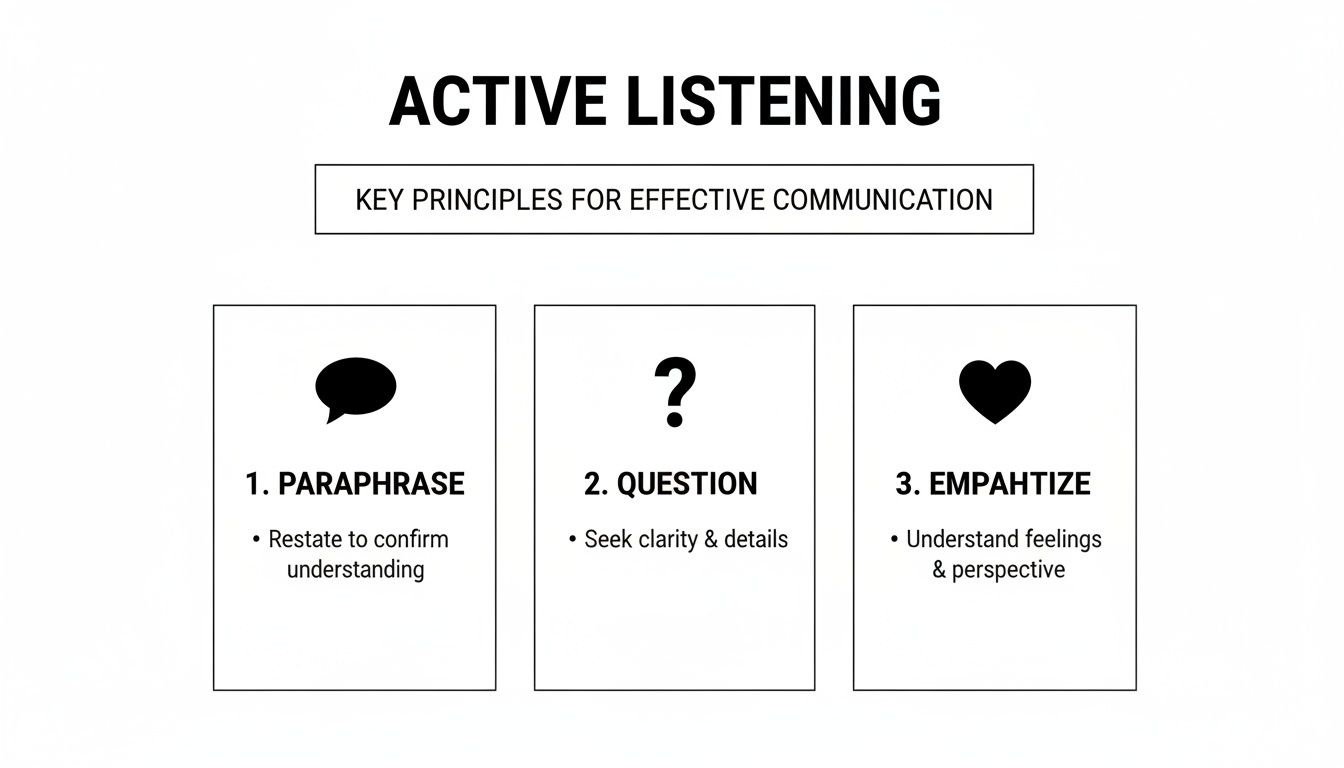
The principles in this graphic—paraphrasing, questioning, and empathizing—are just as crucial for the speaker as they are for the listener. They remind us that true communication is always a two-way street.
Imagine a developer recording a 60-second video on their Mac that shows the exact steps to reproduce a bug. It eliminates all guesswork for the engineering team. Or a marketer creating a quick demo of a new campaign dashboard so the sales team knows precisely how to pull reports. Visuals provide a level of clarity that text alone can't match. You can find more tips on using visuals effectively in our guide on how to improve presentation skills.
Give and Receive Feedback That Actually Helps
Let’s be honest: most of us dread feedback. Giving it feels awkward and confrontational. Receiving it can feel like a personal attack. But when feedback is handled well, it’s not a criticism—it’s a powerful tool that helps everyone get better at what they do.
The trick is to stop thinking of feedback as a judgment and start seeing it for what it is: valuable information. It’s a gift, really. A chance to see our own blind spots and help our colleagues see theirs, making the whole team stronger.
A Practical Framework for Giving Feedback
To deliver feedback that’s helpful, not hurtful, you need a solid framework. Vague comments like, “You need to be more proactive,” are basically useless because they don’t tell the person what to do.
This is where the Situation-Behavior-Impact (SBI) model comes in. It’s a simple but incredibly effective way to strip the emotion and judgment out of the conversation and focus on the facts.
Here’s the breakdown:
- Situation: Pinpoint the specific "when and where." This anchors the feedback to a real moment, not a general feeling.
- Behavior: Describe exactly what the person did or said. Stick to observable actions, not your interpretation of their motives.
- Impact: Explain the tangible result of that behavior—how it affected you, the team, or the project.
Using this structure shifts the dynamic from a potentially tense confrontation to a collaborative problem-solving session.
Instead of a vague accusation like, "You were really quiet in that client meeting," SBI helps you be specific and constructive. Try this instead: "On the client call this morning (Situation), I noticed you didn't share your data when they asked about performance (Behavior). As a result, we couldn't fully answer their questions and looked unprepared (Impact)."
Scripts for Those Tricky Conversations
Let's put SBI into practice with a classic workplace scenario: a missed deadline. It’s easy to let frustration take over, but that just puts people on the defensive.
Imagine a colleague missed their deadline for a report you desperately need.
- Weak Feedback: "You missed the deadline again. This is really holding us up." (This sounds like an attack and will probably just make them defensive.)
- Strong Feedback (SBI): "Hey, I wanted to check in about the Q3 report. The deadline was this morning (Situation), and I haven't seen it come through yet (Behavior). I'm blocked from finishing my part of the presentation for tomorrow without those numbers (Impact). Can we talk about what happened?"
See the difference? It's objective, non-confrontational, and opens the door for a real conversation about what went wrong and how to fix it.
The Art of Receiving Feedback Gracefully
Giving good feedback is only half the equation. How you receive it is just as crucial for your own growth. Our gut reaction is often to get defensive, but learning to pause and listen is a professional superpower.
When someone offers you feedback, your only job in that moment is to listen.
- Breathe and Just Listen. Take a deep breath. Fight that immediate urge to interrupt, explain, or justify. Let them finish their thought completely.
- Ask Questions to Understand. Once they’re done, make sure you get it. Ask clarifying questions like, "Could you give me a specific example of when you noticed that?" or "When you say my emails are unclear, what part is causing the confusion?"
- Acknowledge and Say Thanks. You don't have to agree with every single point, but you should always acknowledge the effort. A simple, "Thank you for sharing that with me. I appreciate you bringing it to my attention," shows that you're open to growing and that you value their input.
This stuff matters. When communication breaks down, it takes a real toll. Research shows that poor communication kills productivity for 49% of employees and causes 63% to waste time just hunting for basic information. On the other hand, companies that get it right and foster transparent communication see 50% lower turnover. You can discover more insights on the impact of workplace communication on Chanty.com.
Practice Makes Perfect with macOS
Knowing how to give feedback is one thing; actually doing it when you're nervous is another. If you're a macOS user, you have a powerful practice tool right at your fingertips.
You can use the built-in screen recorder (Shift-Command-5) or a dedicated macOS app like Screen Charm to rehearse those difficult conversations.
Grab a trusted teammate and role-play a feedback scenario. Record yourself, then watch it back. Pay attention to your tone of voice, your body language, and your exact wording. Practicing in a safe space like this lets you work out the kinks before you step into a real, high-stakes conversation, making it far more likely your feedback will land the way you intend it to—as a tool for growth.
Navigating Communication in Remote and Hybrid Work
Let's be honest, digital communication has its own quirky set of rules. The casual desk chat has morphed into a barrage of Slack messages, and asking a quick question can somehow turn into a 30-minute calendar invite across three time zones.
This new way of working brings its own headaches. Tone gets lost in text, causing friction that never needed to happen, and the endless parade of video calls leaves everyone feeling drained. It's no wonder a FlexOS report found that 30% of employees feel frustrated by unclear communication from their managers in a remote setting. To succeed, you have to get good at this.
The real secret isn't just about getting better at meetings; it's about having fewer of them. The most effective remote teams embrace thoughtful, asynchronous communication, especially when they're spread across the globe.
Lean Into Asynchronous Communication
Asynchronous communication is simply sharing information without demanding an instant reply. It’s not about ignoring your team; it's about respecting their time and focus. Think of it as sending a detailed video update they can watch when it works for them, instead of pulling everyone into yet another meeting.
This one shift can be a massive productivity booster. It gives people permission to unplug and actually get deep work done, free from the constant ping of notifications.
The point of remote communication isn't to perfectly copy the in-person office—it's to build something better, more efficient, and more flexible. Async updates slash meeting bloat and give everyone their time back.
Of course, for this to work, clarity is king. A vague async message just creates more back-and-forth than the meeting it was supposed to replace. This is where showing your work, not just talking about it, becomes your superpower—especially for macOS users.
Create Crystal-Clear Demos on Your Mac
You know the pain of trying to explain a complex workflow or a software bug over email. It's a recipe for confusion. This is where a quick screen recording makes all the difference. For developers, indie creators, and support teams using macOS, a short, sharp video is the fastest path to getting your point across.
A macOS app like Screen Charm makes this incredibly simple. When you record your screen, it automatically zooms in on your cursor and highlights your clicks, so your viewer knows exactly what to look at. It takes all the guesswork out of the equation and ensures your message lands perfectly the first time.
Just think about the possibilities:
- Developers on macOS: Instead of writing a novel of a bug report, just record a 30-second clip showing the exact steps to reproduce the issue. Problem solved.
- Marketers: Need to get the sales team up to speed on a new campaign dashboard? A quick demo video showing them where to find the key metrics is far more effective than a dense email.
- Founders: You can send polished, pre-recorded product updates to investors and stakeholders, walking them through new features with a professional touch.
These videos become a library of resources you can use forever, cutting down on repetitive questions and making it a breeze to onboard new hires. You can even explore different audience engagement strategies to make your async updates stick.
Make Your Video Calls Count
While async is a game-changer, some conversations just need to happen in real-time. The trick is to make those video calls actually matter. We've all felt "Zoom fatigue," and it's usually because we're sitting in on poorly-run meetings where no one is really engaged.
To step up your video call game, start treating every meeting like an active conversation, not a passive TV show.
- Always Have an Agenda: Every single meeting invite needs a clear purpose and a list of what you'll cover. If you can't define a goal, it probably shouldn't be a meeting.
- Keep People Involved: Don't just monologue. Call on people by name, ask pointed questions, and use tools like polls or shared whiteboards to pull everyone into the discussion.
- Turn That Camera On: Seeing faces builds real connection. Try to foster a "cameras on" culture, and remember to look at your webcam—not just your screen—to create a sense of eye contact. Your nonverbal cues are just as critical online.
By mastering both thoughtful async updates and focused video calls, you can not only survive but thrive in a remote environment. You’ll get your calendar back and help your whole team work smarter.
Your Personal Communication Improvement Plan
Changing how you communicate doesn't happen overnight. It's a journey. The biggest mistake people make is trying to fix everything at once, which just leads to feeling overwhelmed. The real key to progress is creating a personal, actionable roadmap.
Instead of trying to master active listening, feedback delivery, and remote communication all at the same time, just pick one. Seriously, just one. Ask yourself what single skill would make the biggest immediate difference in your day-to-day work, and start there.
Set Measurable Mini-Goals
Vague goals like "I'll be a better listener" are impossible to measure and easy to forget. You need to get specific. Turn that abstract idea into small, concrete actions you can actually track.
Let's try that again. A better goal would sound like:
- "In my next two team meetings, I will paraphrase a key point to confirm I've understood it correctly."
- "This week, I'm going to use the Situation-Behavior-Impact model to give feedback to a junior team member."
See the difference? These mini-goals are simple and trackable, and they build momentum. Each small win reinforces the new habit, making it much easier to stick with your plan. This approach is one of the core microlearning best practices, proving that small, focused efforts really do lead to significant gains.
Create Your Personal Skills Portfolio on Your Mac
One of the best ways I’ve found to see real progress is to create a visual record of your improvement. This is where your macOS device becomes your secret weapon. Using a screen recorder built for macOS like Screen Charm, you can build a personal skills portfolio right on your computer.
Think of it as your own personal highlight reel. Recording short clips of yourself practicing provides tangible proof of how far you've come, which is a huge motivator.
Got a big presentation coming up? Record a one-minute clip of your opening. Need to give some tricky feedback? Rehearse the conversation on camera first. Watching yourself back is like having your own personal coach—you can spot things about your tone, clarity, and body language you’d otherwise miss.
Over time, this collection of recordings won't just show your progress; it will build genuine confidence. You'll have a clear, visual history of your journey from where you started to where you want to be.
Got Questions? We’ve Got Answers
You're not alone if you're wondering where to even begin with improving your communication skills. Let's tackle some of the most common questions that pop up.
If I Can Only Focus on One Skill, What Should It Be?
Hands down, active listening. It’s the one skill that acts as a force multiplier for everything else.
When you genuinely listen, you're not just waiting for your turn to talk—you're building trust, heading off misunderstandings before they start, and showing people you respect them. You quickly become the person others turn to because they know you get it. That's how leaders are made.
How Do I Deal with a Really Difficult Coworker?
Communicating with a challenging colleague can be tough, but the key is to stay objective. Stick to the facts and sidestep the emotional drama.
A great way to do this is by using "I" statements, which let you express your point of view without pointing fingers. For example, instead of saying, "You confused me," try, "I was unclear on the next steps after our last conversation." It completely changes the dynamic.
Remember, the goal here is to be effective at your job, not to become best friends. Focus on finding a solution that moves the project forward. Keep the conversation centered on your shared professional goals, and you'll find it much easier to navigate personal differences.
Can I Really Use My Mac to Get Better at Soft Skills?
Absolutely. Your Mac is a surprisingly powerful tool for practicing and getting honest feedback on your communication style.
Think about it: you can use a macOS app to record yourself running through a presentation or a tricky feedback conversation. Watching it back gives you an outside perspective on your own tone, clarity, and even body language—things you can’t possibly self-assess in the heat of the moment.
This gives you a safe space to work out the kinks. You can rehearse that complex technical explanation or practice delivering sensitive news until you know you're coming across as clear and confident. It’s like having a private rehearsal studio before you step onto the main stage at work.
Ready to put this into practice? Screen Charm for macOS makes it incredibly easy to record yourself and create polished demos, tutorials, or updates that land perfectly every time.
Start creating your own stunning videos in minutes. Check out how at https://screencharm.com.